

Enel Spina Smart: consumption under control in the App
How many times has it happened that the power “went out” at home or you postponed doing the laundry for fear that the meter would trip? With Enel Spina Smart you can monitor your Energy consumption and avoid electrical overloads. The compact and smart device can be easily configured on the Enel App and helps you control and manage your energy consumption whenever you need it.
Enel Spina Smart: guide to features and advantages
Enel Spina Smart is a simple and accessible device that helps you understand, monitor and forecast your electricity bill.


Why choose it
Enel Spina Smart is convenient and easy to use: thanks to activation via the Enel App, you have on your mobile a clear overview of the key data to manage consumption and better understand your bill.
It also allows you to:
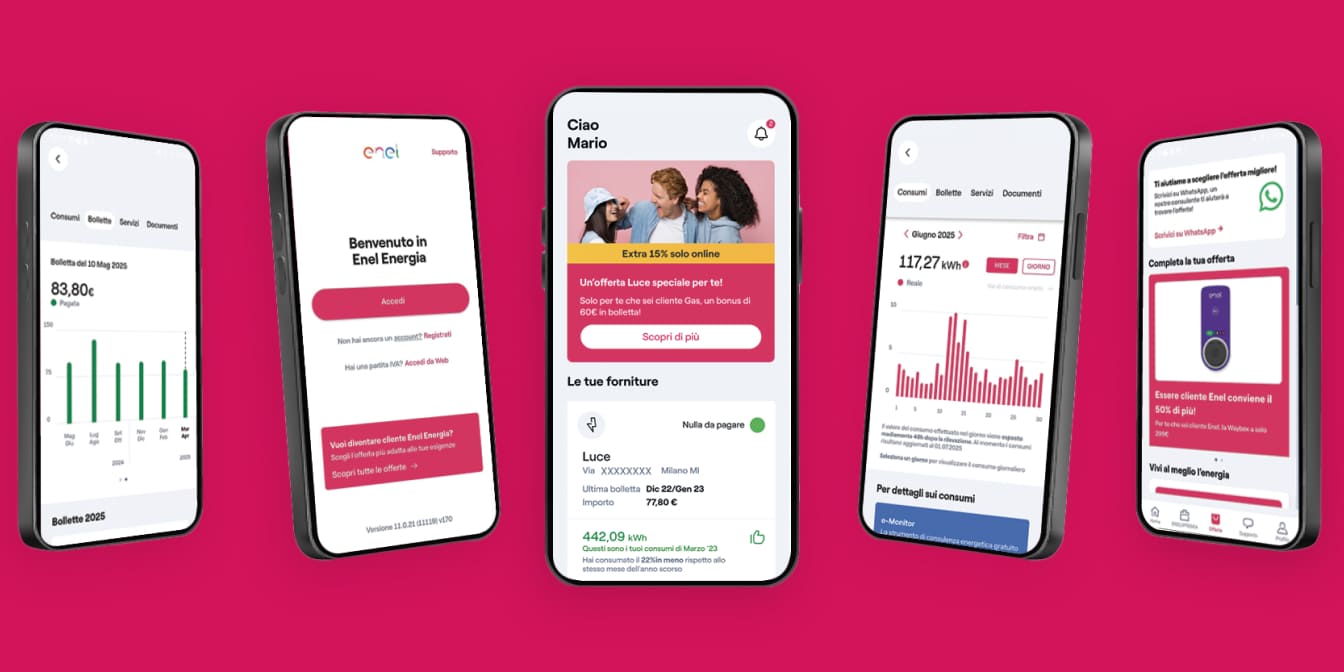
View your consumption data always up to date: for the first time you have access to detailed data on your consumption at 15-minute intervals. In this way, you can monitor your daily, weekly and monthly consumption habits and your consumption compared to your history.
Keep the committed power under control: you can check the power used every day and understand when you are approaching the meter threshold, so you can better manage loads and avoid interruptions before the meter trips. In this way, you will not risk power outages.
Assess whether you need more power: if your consumption shows that the available power is not sufficient, check how to modify the meter power.
What you can do in the App
By connecting it to a home socket and configuring it in the App, you can monitor:
Real-time power: to know how much your home is consuming and view the committed power based on the limits of your offer.
Daily consumption with 15-minute detail: to see the daily total at 15-minute intervals and compare it with the previous day, with your tariff information.
Monthly consumption: to monitor the monthly total and compare it with the previous month.
How to obtain and configure Enel Spina Smart
If you have a 2G meter, have a Power tariff with Enel and consume a lot of Energy at home, Enel Spina Smart will help you avoid surprises on your bill. Book an appointment at the nearest participating Enel Space and collect the device, which will be delivered with a support manual.
After collecting the device, you can install it on any socket and configure it immediately via the PLUG and PLAY functionality, with no installation or maintenance costs. To pair the device directly in the Enel App, follow these steps:
Connect Enel Spina Smart to a power socket (excluding multiple sockets and extension cords) near the Wi-Fi modem and wait until the blue and red LEDs turn off;
Access the Enel App;
Select your Power supply in the reserved area and click on “Enter Enel Spina Smart” to start the guided configuration procedure;
Press and hold the activation button on Enel Spina Smart and release it after 4 seconds. When the white LED starts flashing, continue on the App;
Allow Bluetooth and location permissions: they only need to be enabled during the configuration phase;
Select your Wi-Fi network and enter the password.
At this point, the configuration is complete and the service will be active within the following 48 hours.



Verify ZIP Code
Enter the ZIP code of the residence for which you want to activate the offer and check if you're eligible. If the result is positive, you can proceed with the subscription.

Ci dispiace! Sembra che il tuo CAP non rientri tra quelli in cui è possibile sottoscrivere l’offerta
Find out what type of Fiber is available at your address
With Enel Energia Fiber, you always surf at the highest speed available. Enter your address and discover the details of your new connection.
Ci dispiace! L’indirizzo che hai inserito non è ancora raggiunto dalla fibra di Enel Energia
In questo momento non è possibile attivare l’offerta sull’indirizzo indicato perché non è raggiunto dalla fibra di Enel Energia. Puoi sempre verificare un altro indirizzo.
Qualcosa è andato storto
Riprova più tardi
By purchasing the air conditioner, you’ve unlocked an exclusive discount code and are entitled to a reward. Enter the code to receive a €360 bill bonus with the Formidabile Luce offer tailored for you.


Formidabile Luce for you
The Formidabile Luce offer includes a discount on the list price of the energy component for customers switching from the Servizio di Maggior Tutela.
Locked for the first 12 months
Commercialization and Sales Fee
12 €/kWh
Air Conditioner at a Formidable Price
Purchase an Enel X air conditioning system with delivery, standard installation, and ENEA paperwork support included.*
Price air conditioner
, month

Standard installation included
ENEA paperwork support included*