

Fiber Assistance
On this page you will find useful information, dedicated services and the documents required for the Fiber service


The technologies used are:
FTTC (Fiber To The Cabinet): a connection that brings fiber optics from the central office to the street cabinet, then continues with copper to the customer’s home — also known as mixed fiber-copper.
FTTH (Fiber To The Home): a connection that brings fiber optics directly from the central office to the customer’s home, allowing for higher browsing speeds.
Enel Energia offers either “data-only service” or “data plus voice”. If you wish to keep your current phone number active, make sure to select the “data plus voice” offer, which allows you to request number portability.
If you no longer need the voice service, you can subscribe to a “data-only” offer. However, we will still need your landline phone number to activate the internet service. Also note: if your existing line is migrated from your current operator to Enel Energia, once the data service is active, the voice service will be automatically terminated, resulting in the loss of your current phone number.
If migration is not technically possible and a new line needs to be activated, you will be notified, and it will be your responsibility to cancel your contract with the previous provider.
To check whether your address is covered by Enel Energia’s fiber service, visit the dedicated page.
Activation is free if you subscribe through our online offers or promotional campaigns and choose direct debit as your payment method (bank account, postal account, or payment card). For other offers, an activation fee may apply, as outlined in the contract summary and tariff transparency documents.
To activate a new line, check whether fiber is available in your area and what technology is used. Here's how:
- Visit the section dedicated to Enel Energia's Fiber offers.
- Choose either “Already an Enel Energia customer” or “Not yet an Enel Energia customer”.
- Check if your address is covered and proceed with your request.
- Alternatively, you can use one of our contact channels.
For more information, visit the dedicated page.
To subscribe, you must provide the migration code from your current provider (and possibly your active landline number). We will then check:
If a direct migration is possible using the same technology, we will take care of cancelling your current contract and voice service (if active).
If a new line activation is required (e.g., switching from FTTC to FTTH), you must cancel your old contract to avoid double billing.
The migration code (also called transfer or secret code) is a unique identifier assigned when your service is activated. It identifies your current operator and is essential for switching providers. It is between 7 and 19 characters long and can be found on your bill, or you can request it from your current provider’s customer service.
The required work depends on the situation:
For migrations, a technician may need to visit.
For new lines, a technician visit is always necessary. The scope of the work depends on the access technology (FTTC or FTTH) and whether work must be done inside or outside the home (with your agreement and permission).
The technicians from the Wholesaler (the operator that manages the infrastructure) will assess the work on-site. Once installation is complete and you receive a confirmation email that your Enel Energia fiber service is active, connect your modem as per the included instructions. Usage and configuration details are always available in your Customer Area.
Yes, you can subscribe even if you don’t have a landline.
Yes, you can. Visit the dedicated configuration page to set it up.
If the switch was done via direct migration, your old contract and voice service (if active) will be automatically canceled.
If the switch involved activating a new line (e.g., tech upgrade from FTTC to FTTH), your previous line will not be automatically canceled. You must check the cancellation terms with your previous provider to avoid double billing.
If you haven’t already, register in the Customer Area and download the Enel Energia App. For more information, visit the dedicated section.
We have collected some information on the bill to provide you with every answer in a practical way. If you need to learn more, consult the page dedicated to the faqs on the bill. To find out all the ways at your disposal to pay your bill, discover with us the advantages of each payment method: we will help you understand the most suitable one for you.
You can pay your bills via:
- direct debit on an Italian or foreign bank account in the SEPA area (SDD), postal account (SDD), PayPal account;
- pagoPa payment notice, either online with the IO app or via your bank's App/website or other pagoPA-enabled channels; both at banks, ATMs, betting shops, post offices, supermarkets and all authorized shops. Using pagoPA you will not have to send any receipt;
- Customer Area on the enel.it website and App by Enel Energia.
For more details, visit the dedicated page.
You can find your Fiber supply bills by accessing your Customer Area, or within the App by Enel Energia.
You will receive the invoice for the fiber service every two months, based on the activation date of the service.
There is no charge for the security deposit for the provision of the fiber service.
Do you need clarifications and more technical and specific indications of the Fiber world? Read the faq and learn more in the detail pages.
In the event of defects or malfunction, Enel Energia will replace the modem provided on a loan-for-use basis free of charge, with no additional costs.
If the malfunction is due to a network issue, Enel Energia will carry out remote maintenance or, if necessary, send a technician.
Maintenance does not include the provision of accessories or consumable materials.
Repairs due to improper use, negligence, tampering, or accidental causes (e.g. lightning, natural disasters) are excluded.
In case of damage or theft of the modem not attributable to Enel Energia, a penalty of €50 will be charged.
You can find the setup instructions inside the modem packaging. Log in or register in the Customer Area of the website enel.it to learn about the terms of use and configuration, or visit the following pages:
If you need help, you can always contact one of our Contact Channels.
You will need to perform a "Factory Reset," which will return the modem to its initial configuration and restore all its default settings, including the WiFi access password and modem management password.
Depending on your modem model, follow the steps below:
- Zyxel DX3301: Press and hold the "Reset" button on the bottom left of the back of the modem for at least 5 seconds.
- TP-Link VX832v: Press and hold the "Reset" button on the bottom of the modem for at least 10 seconds until all the LEDs light up.
Depending on the model you have, you need to follow a different procedure:
- Zyxel DX3301 Modem
You will need to follow these steps:
If this is your first time logging in:
Open your browser (e.g., Edge, Mozilla, Chrome) and type 192.168.1.1.
Enter the following login credentials:
Username: admin and Password (the default one on the router label)
After logging in, a window will open where you can enter your new password. Click "Change Password" or, if you don't want to change it, select "Skip."
For subsequent logins:
Open your browser (e.g., Edge, Mozilla, Chrome) and type 192.168.1.1.
Enter the following login credentials:
Username: admin and Password: the default one on the router label or the one you configured during your first login.
After logging in, in the screen that appears, click the burger menu in the top right and select "User Account" (the section located under "Maintenance").
Select the "Change" section, enter both the current and new passwords (twice), and click OK.
If the password you entered meets the requirements, a confirmation pop-up will appear, and you can then proceed with the change. Log in again with the new password.
The password must contain at least one numeric character and one alphanumeric character, and must be between 6 and 64 characters long.
- TP-Link VX832v Modem
Open your browser (for example, Edge, Mozilla, or Chrome) and type 192.168.1.1 in the address bar.
Enter the router password found on the label on the bottom of the modem or the one you changed after logging in for the first time.
After logging in, go to "System Tools" and then select "Administration."
In the "Account Management" section, click "Administration." Enter your old router password, then enter the new password twice. Select the SAVE button immediately below.
Visit www.misurainternet.it and use the Ne.Me.Sys software — the official tool from AGCOM’s “Misura Internet” project — to perform certified fixed-line internet quality measurements.
Yes, you can use a different modem, but it must meet the technical requirements needed for the service to work correctly.
In this case, you must subscribe to the specific modem-excluded offer via the www.enel.it website.
To configure your own modem:
Follow the instructions available in your Customer Area, if registered.
Or contact us through our support channels.
Note:
If you use a third-party modem:
You will be responsible for its maintenance.
You will not have access to services such as dedicated technical support, automatic software updates, or performance improvements.
When you first set up your device, the Wi-Fi network name and password are listed on the device's label. From your Wi-Fi settings, select the Wi-Fi network name shown on the label and enter the password to connect.
You can later change it.
Depending on your modem model, follow the steps below:
- ZYXEL DX3301 Modem
Open your browser (e.g., Edge, Mozilla, or Chrome) and type 192.168.1.1 in the address bar.
Enter your credentials: type "admin" for the username, and use the default password, which you can find on the label on the bottom of the modem, or the one you changed when you first logged in.
After logging in, go to "Wi-Fi Settings." Click on the eye icon to see the current password, then on the ">" icon. to change it.
On the new page, uncheck ☑ from "Reset default password," enter the new password, and click "Save."
To verify that the change has been made, click the eye icon again and check the new password.
The password must contain at least one number and at least one letter. It must be between 6 and 64 characters long.
- TP-Link VX832v Modem
Open your browser (e.g., Edge, Mozilla, or Chrome) and type 192.168.1.1 in the address bar.
Enter the router password found on the label on the bottom of the modem, or the one you changed after logging in for the first time.
After logging in, go to "Wireless" and Select "Wireless Settings."
Enter the new password in the appropriate field and then select the SAVE button at the bottom of the page.
Wait for the password to save.
The password must contain at least alphanumeric characters. It must be between 16 and 64 characters long.
Zyxel DX3301: The modem is equipped with 5 Ethernet ports (one of which can be used as a WAN port) and 1 FXS port for voice service. The modem provided on loan also supports Wi-Fi 6 (11ax) with speeds of up to 1200 Mbps for the 5 GHz frequency and 574 Mbps for the 2.4 GHz frequency.
TP-Link VX832v: The modem is equipped with 4 Ethernet ports (one of which can be used as a WAN port) and 1 FXS port for voice service. The modem provided on loan also supports Wi-Fi 6 (11ax) with speeds of up to 4804 Mbps for the 5 GHz frequency and 1148 Mbps for the 2.4 GHz frequency.
By default, the modem enables band steering, which means a single Wi-Fi network name is used for both 2.4 GHz and 5 GHz.
Devices automatically connect to the best available band.
Enel Energia uses a technology (CG-NAT) that allows a single public IP address to be shared among multiple users. The public IP address is transformed and shared into multiple private IP addresses for end users via a device at the Enel power plant. Therefore, your home modem is assigned a static, private address.
The Enel Energia Fiber connection assigns a private static IP address to the modem.
Therefore, you should verify whether your devices require a public IP address assigned to the router.
To withdraw from the contract, you can contact our Customer Service on the free toll-free number 800900860, go to a Physical Point (Spazio Enel, Spazio Enel Partner) or use the form available on the enel.it website. If you decide to use the form on the site, you can download it and return it filled out using one of the following methods:
- Email address: allegati.enelenergia@enel.com;
- Pec: servizio.clienti.enelenergia@pec.enel.it;
- Post: PO Box 8080 - 85100 Potenza (PZ);
- Physical Points (Spazio Enel, Spazio Enel Partner).
The withdrawal must be communicated at least thirty days before the deadline indicated in the contractual documentation, and will take effect from the date of registration of your request in Enel Energia's computer systems and, in any case, no later than thirty days from your communication.
In the event of deactivation, you will have to return the Modem within 30 days, which will start from the date of definitive termination of the service by Enel Energia.
In case of failure to return the Modem, you will be charged an amount of 50 euros, as set out in the "Summary of the contract" document.
In case of withdrawal you will be required:
- upon payment of a deactivation cost, equal to the amount indicated in the Offer and in the Contractual Summary. This cost is not due if you withdraw due to non-acceptance of the contractual and economic changes communicated by Enel Energia or when Internet access does not meet the quality levels contractually envisaged or when, upon expiry of the first contractual commitment, the contract is automatically renewed indefinitely;
- to pay the fee for the Service used up to the effective date of the withdrawal;
- to pay Enel Energia a penalty, to the extent indicated in the Offer and in the Contract Summary, if after withdrawal you do not return the modem within the terms and in the manner indicated in the General Contract Conditions.
Enel Energia provides its customers with a series of digital tools and services useful for autonomously and conveniently managing all aspects of its power, gas and fiber supplies.
You can use the following channels to contact Enel Energia.
- Online channels: enel.it (Live Chat), Enel Energia App (EnelClic), Pedius;
- Customer Service at the toll-free number 140 (for calls from Italy) available Monday to Sunday from 7:00 a.m. to 10:00 p.m. (excluding national holidays) or +39 0664511012 (for calls from abroad, subject to charges and at the cost applied by your telephone operator);
- Email to "allegati.enelenergia@enel.com", certified email to "servizio.clienti.enelenergia@pec.enel.it", regular mail to "Casella Postale 8080 - 85100 Potenza (PZ)";
- Physical points: Spazio Enel or Spazio Enel Partner (find all the addresses on the page Spazio Enel);
- Social channels: Telegram (@EnelEnergiaBot), WhatsApp (+39 329 8710714), Messenger (Enel.Energia.10), X
- “deaf,” as defined in Article 1, paragraph 2, of Law No. 381/1970;
- “totally blind,” as defined in Article 2 of Law No. 138/2001;
- “partially blind,” as defined in Article 3 of Law No. 138/2001.
- "Disabled persons with severe walking limitations," eligible for the tax benefits referred to in Article 30, paragraph 7, of Law No. 388/2000.
The benefit is recognized in compliance with AGCOM Resolution No. 290/21/CONS and applies to the base price of all Enel Energia Fiber offers for fixed-line data services, regardless of technology and connection speed. Pay-as-you-go offers are excluded. For more information, visit the dedicated section for users with disabilities.
After subscribing to one of the Enel Energia Fibra offers, both for the data-only service and for the data and voice service, it is necessary to send Enel Energia the "Request for activation of the benefit" form which you can find on the page Facilities for customers with disabilities, together with the required documentation. For more information go to dedicated section for users with disabilities.
If you want the discount to be applied from the effective date of one of Enel Energia's Fibra offers for fixed-line data service, we recommend that you send the request (form and expected documentation) as soon as you have subscribed to one of the aforementioned offers. Otherwise, you can send the request (form and relevant documentation) at any later time in the contractual relationship, and in that case the facility will take effect from the date of receipt of the request complete with the necessary documentation.
For cases of maintaining the facility granted by another operator ("invalids with severe limitations in walking ability"), the facility is applied from the effective date of Enel Energia's Fiber offer.
For more information go to dedicated section for users with disabilities.
You can view and download the Charter of Services on the website enel.it and within your Customer Area.
The offer that includes both data and voice services entails a pay-per-use fee for voice calls and a fixed monthly fee for the data service.
Call costs are €0.05 per minute (VAT included) with no connection charge, valid for calls to national landline and mobile numbers.
For more information on the pricing details of your plan, please check the price list on www.enel.it.
Yes, the Voice service allows you to receive calls without any additional charges.
Yes, if you choose the voice and data offer. You can request number portability by providing your migration code, or opt to get a new number.
The migration code is essential for transferring your data line and/or phone number from your previous operator.
You can find it on the latest bill issued by your current provider.
Yes, you can request a new number when signing the contract.
You can view your masked call records (with the last 3 digits hidden) from the last 6 months by accessing your Customer Area or the Enel Energia App, in the section “Your voice consumption.”
To receive the full call details, you need to download, fill out, and send the Request for Full Call Detail Report form, available in the Fiber Forms section on the Forms page.
If you're switching from a PSTN analog line to a VOIP line, and you want to use the existing wall jacks throughout the house, you’ll need to have an electrician perform a socket rewiring.
This operation disconnects the internal telephone network from the external one and connects it directly to the VOICE1 port of the modem, which then distributes the signal to all phone jacks.
Alternatively, you can use a set of cordless phones, connecting the main base to the modem and placing the others around your home.
Yes, if the number hasn’t been permanently deactivated by your previous operator.
Yes, but you’ll need to sign a new contract for the data + voice offer.
Once the new service is activated, you can then terminate the previous data-only contract, avoiding service interruption.
Yes, you can request number portability after activation, provided your previous operator still holds the number.
Typically, this is possible within 60 days of termination.
No, the Voice service is VOIP-based, and requires an active data connection to function.
Once your data service is active with Enel Energia, the voice service from the previous provider will be automatically terminated, causing you to lose your old phone number.
In case of technology upgrades (e.g. FTTC to FTTH) or switch between wholesale operators, you must independently cancel your old contract with the previous provider.
No, you cannot cancel just the Voice service.
Since it’s pay-per-use, if you don’t make calls, you won’t be charged extra beyond the monthly fee.
For more details on your plan, refer to the “contract summary” in your Customer Area.
This service allows you to block premium-rate numbers for free.
Calls to 144, 166, 709, and 899 numbers are already disabled by default and cannot be re-enabled.
You can also request to block specific numbers or entire international dialing ranges.
To activate the service, download and send the appropriate form available on the website, using the instructions provided within.
The same form can be used later to unblock previously blocked numbers.
To add, remove, or update your phone number in public directories, download and send the appropriate form from the Fiber Forms section on the website, following the provided instructions.
You can update your preferences at any time.
To stop promotional calls, you can register with the Public Do-Not-Call Registry (Registro Pubblico delle Opposizioni) by:
Sending an email to: iscrizione@registrodelleopposizioni.it with the appropriate form
Calling the toll-free number 800 957 766 (landlines) or 06 42986411 (mobiles)
Filling out the form on the official website in the subscriber area
More info is available on the registry’s dedicated page.
For technical support, please contact the Customer Service at the toll-free number 140, where you’ll receive timely assistance.
In the case of a new phone number, the activation time is a maximum of 3 working days from the date of data service activation. In the case of number portability from another operator, the activation will occur within a maximum of 7 working days from the activation of the data service.
In the latter scenario, delays may occur due to the need to reprocess any rejections caused by unforeseen issues, such as incorrect information provided during the subscription process (e.g., phone number or migration code), or other technical reasons.
You’ll receive an email notification confirming that the Voice service has been activated.
Note: this happens after your data service is active.
You can use any wired or cordless phone with an RJ11 plug.
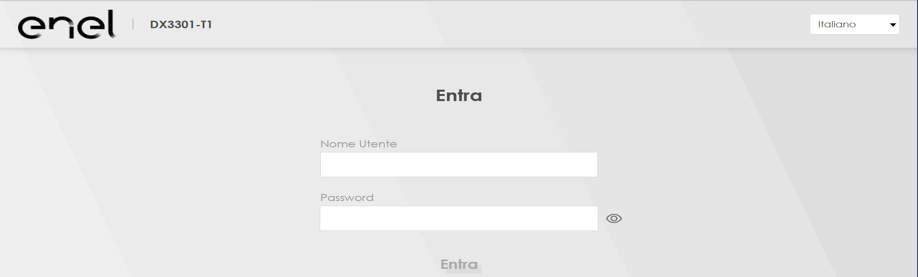
To activate/deactivate “Parental Control”, simply open a browser (Chrome, Edge, Firefox…) and access the interface of the modem provided by Enel by entering the following address in the URL bar: 192.168.1.1.

You will need to enter the following credentials:
- Username: “admin”
- Password: printed on the label on the back of the modem, under “Login Password”.
Yes, you can activate it, but the configuration described above is valid only for modems provided by Enel.
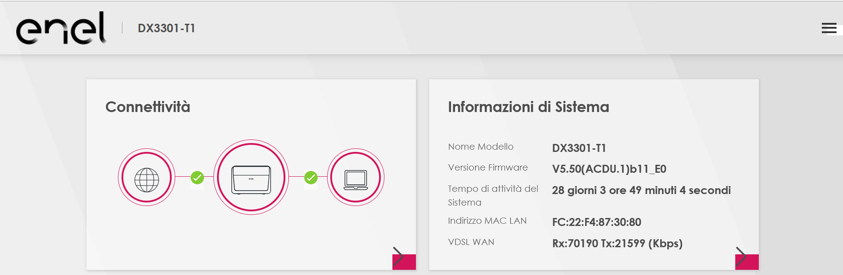
Once logged in, click the menu icon (three bars at the top right):
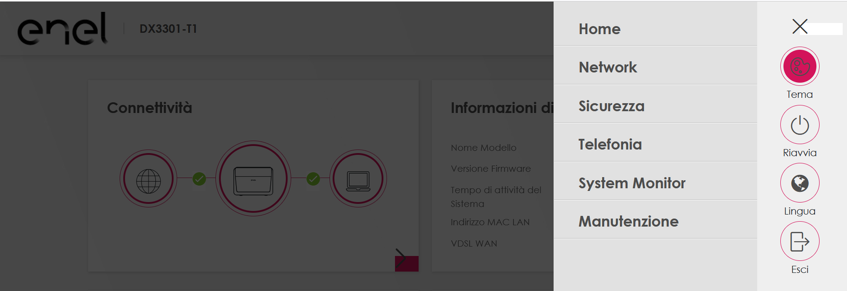
Select the “Security” menu:
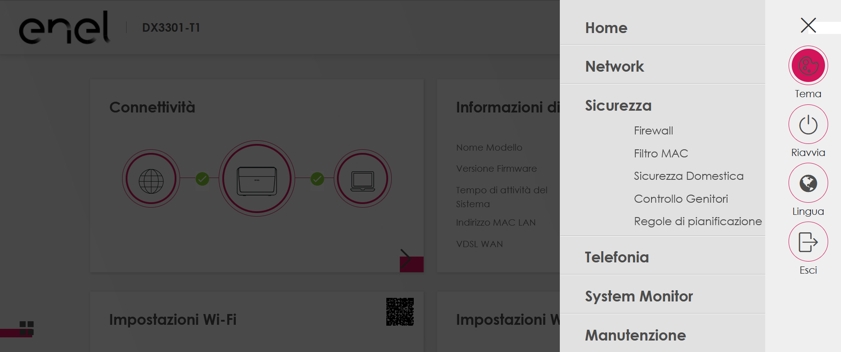
Choose “Parental Control” from the menu:
Select the “Parental Control” tab:
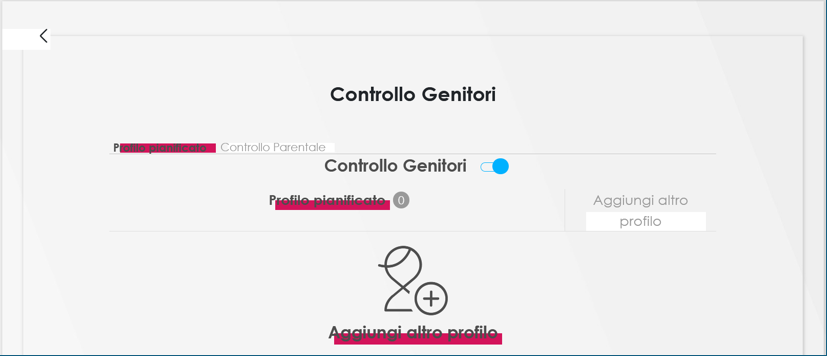
To enable Parental Control, move the toggle from “OFF” (grey):
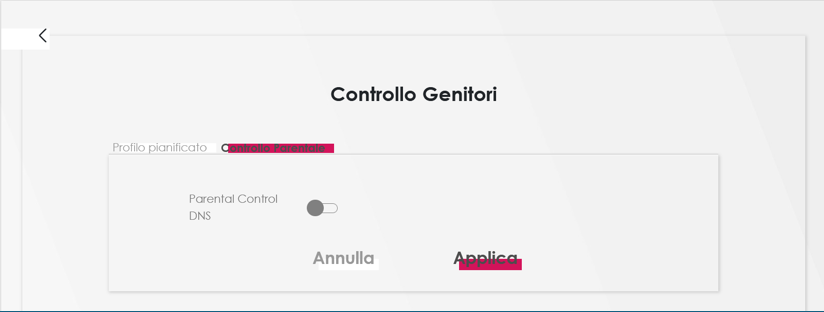
to “ON” (blue) and click “Apply”.
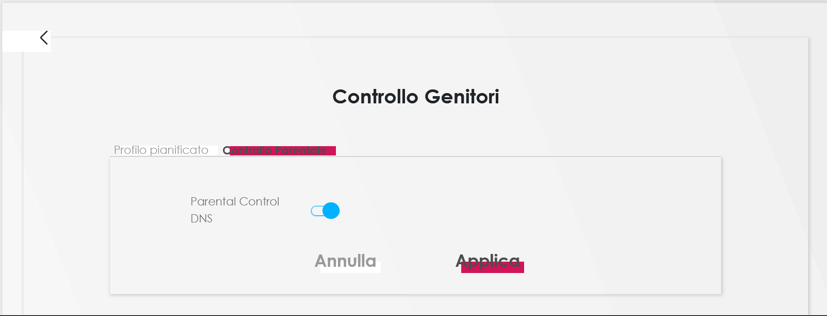
To activate/deactivate “Parental Control”, simply open a browser (Chrome, Edge, Firefox…) and access the interface of the modem provided by Enel by entering the following address in the URL bar: 192.168.1.1.
Enter the code printed on the label at the bottom of the modem in the "Router Access" - "Password" section (or the password if previously changed) in the Password field, then click the "Login" button.
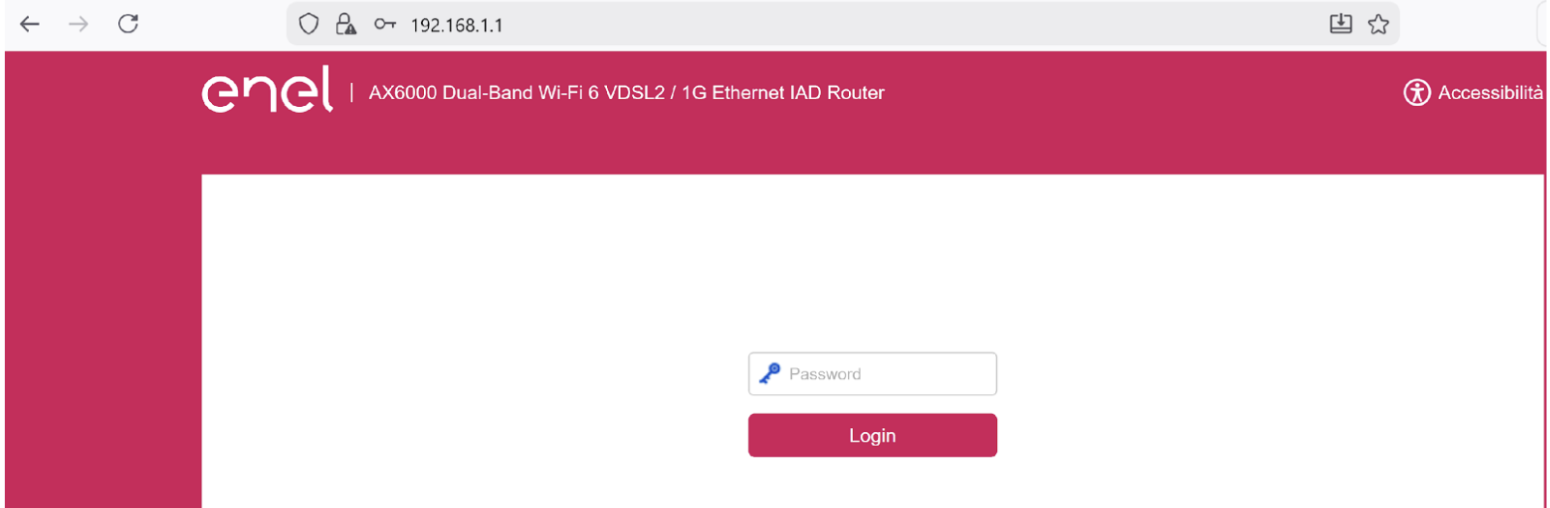
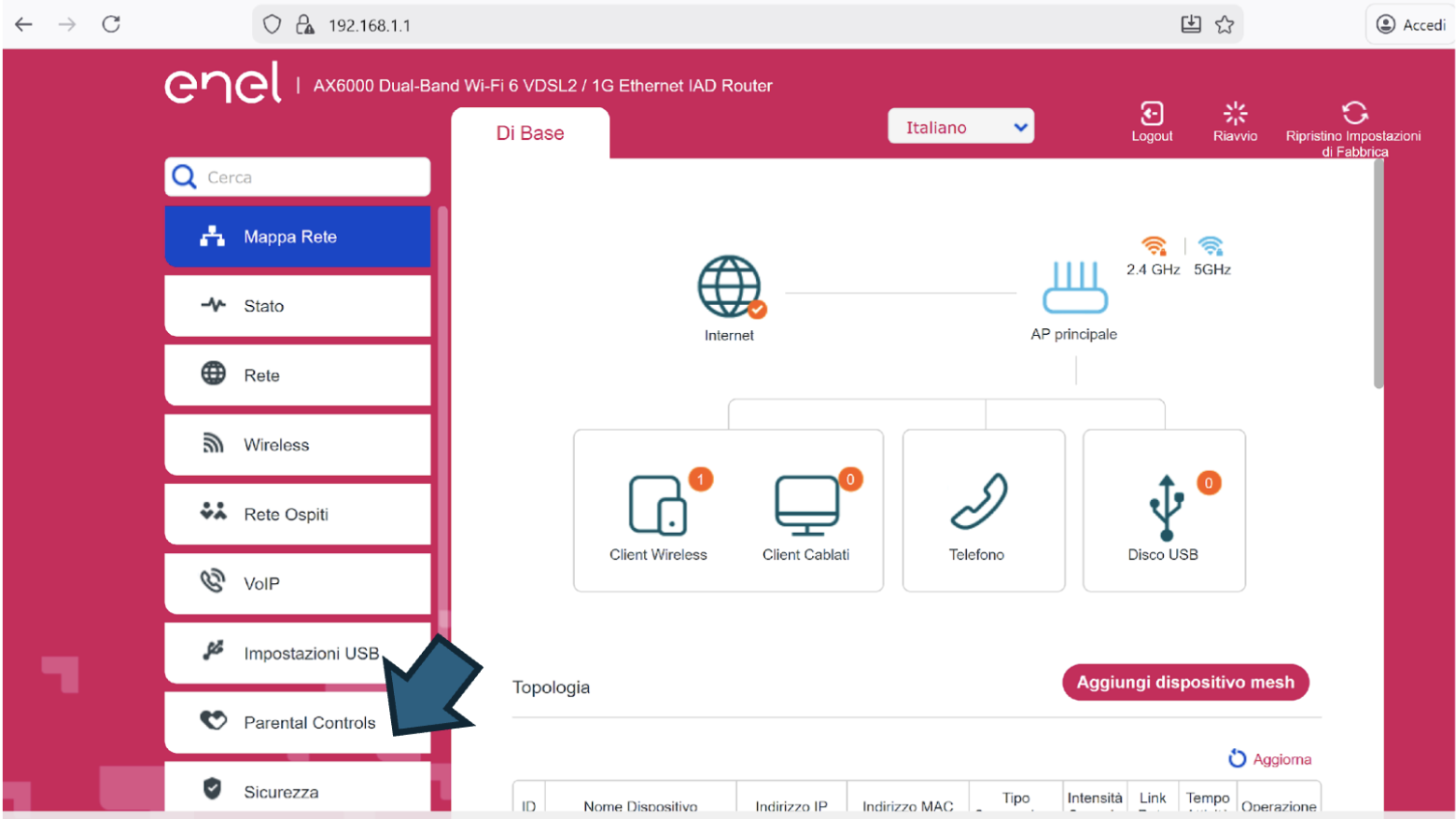
Once logged in, click on “Parental Controls” from the main screen.
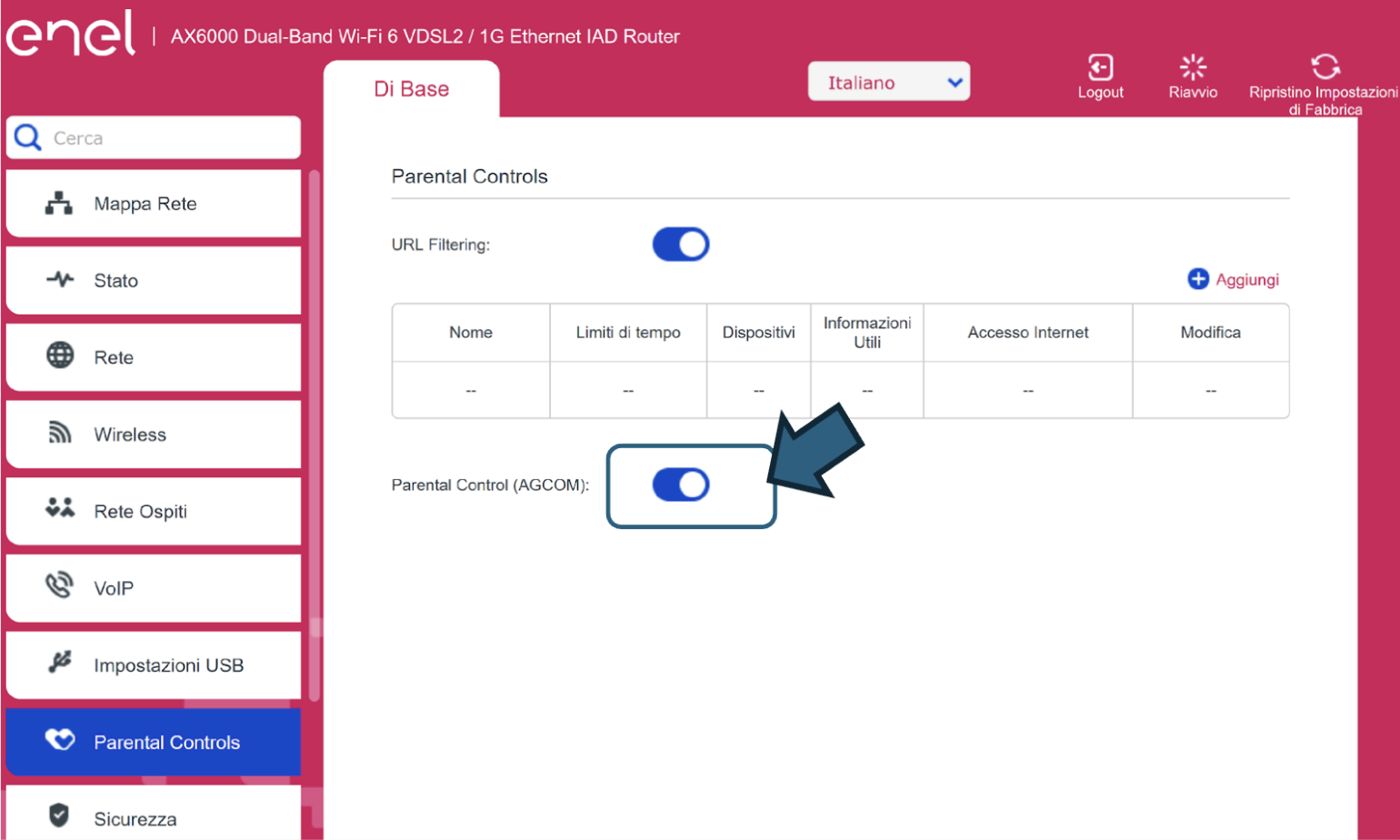
Enable parental control by moving the slider to “ON” (blue).
Conversely, to disable parental control, move the slider to “OFF” (grey).
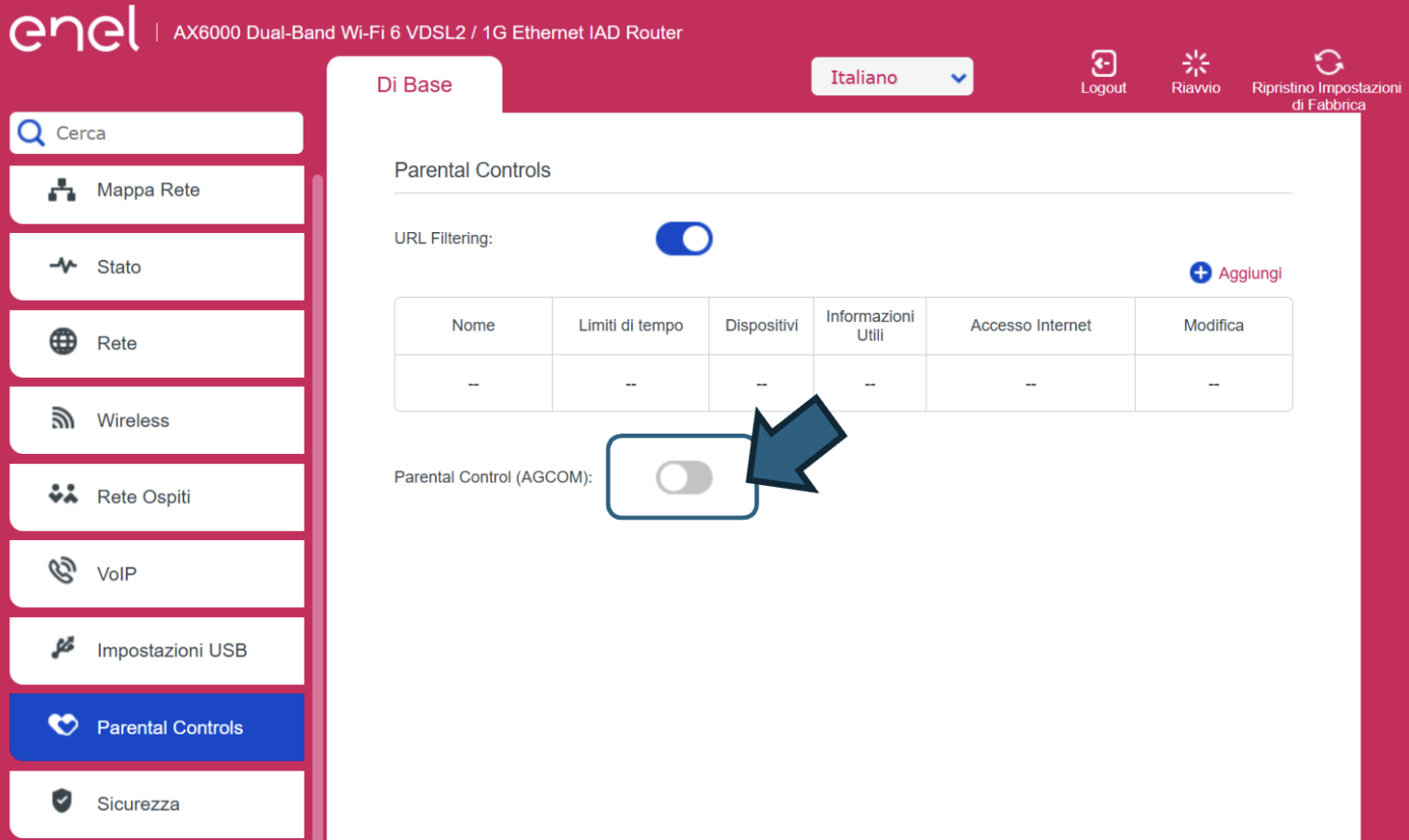
To disable Parental Control, move the toggle back to “OFF” (grey) and press “Apply”.
The Parental Control service is configured on the modem itself, so it applies to all connected devices. It is not possible to differentiate between devices with the control enabled and those without it.
Insights

Image Description Desktop
Image Description Tablet
Image Description Mobile
What to do if you have a slow internet connection

What the AgCom labels mean

How to check fiber coverage

What is optical fiber and how does it work

How to get a fiber optic connection

How many and what types of fiber are there?

All the advantages of optical fiber

Consumer information

Verify ZIP Code
Enter the ZIP code of the residence for which you want to activate the offer and check if you're eligible. If the result is positive, you can proceed with the subscription.


Ci dispiace! Sembra che il tuo CAP non rientri tra quelli in cui è possibile sottoscrivere l’offerta
Find out what type of Fiber is available at your address
With Enel Energia Fiber, you always surf at the highest speed available. Enter your address and discover the details of your new connection.
Ci dispiace! L’indirizzo che hai inserito non è ancora raggiunto dalla fibra di Enel Energia
In questo momento non è possibile attivare l’offerta sull’indirizzo indicato perché non è raggiunto dalla fibra di Enel Energia. Puoi sempre verificare un altro indirizzo.
Qualcosa è andato storto
Riprova più tardi
By purchasing the air conditioner, you’ve unlocked an exclusive discount code and are entitled to a reward. Enter the code to receive a €360 bill bonus with the Formidabile Luce offer tailored for you.


Formidabile Luce for you
The Formidabile Luce offer includes a discount on the list price of the energy component for customers switching from the Servizio di Maggior Tutela.
Locked for the first 12 months
Commercialization and Sales Fee
12 €/kWh
Air Conditioner at a Formidable Price
Purchase an Enel X air conditioning system with delivery, standard installation, and ENEA paperwork support included.*
Price air conditioner
, month

Standard installation included
ENEA paperwork support included*
Codice promozionale non valido
Ops, qualcosa è andato storto
